For every modern business, accepting payments is an important part of converting customer purchases into revenue. Payment processing services provide the technology and financial infrastructure that helps businesses to accept, authorize, and settle electronic transactions.
Whether customers make payments with credit cards, debit cards, digital wallets, ACH, or other methods, multiple systems work together behind the scenes to complete each transaction.
Understanding payment processing services helps business owners to make better decisions about transaction costs, security, payment methods, integrations, and cash flow.
A payment processor, payment gateway, acquiring bank, issuing bank, and payment network, each component plays an important role in moving a payment from checkout to settlement.
The right payment processing services are the one that align with the way a business operates. Ecommerce companies may require online checkout and API integrations, while physical stores may focus on POS terminals and contactless payments.
Subscription businesses may need recurring billing, and businesses operating in specialized markets that may need different payment infrastructure.
AcePay is one example of a specialized payment platform, with its current services focused on cryptocurrency payments.
Businesses considering a provider should review its supported payment methods, pricing, security features, integrations, settlement options, and industry requirements.
This blog will walk you through how payment processing works, common payment processing fees, security considerations, payment methods, and key factors businesses should evaluate before choosing a provider.
Also Read: Credit Card Processing for Small Business: Complete Beginner’s Guide
What are Payment Processing Services?
Payment processing services help businesses to accept and complete electronic payments from customers. It connects the business, customer, financial institutions, and payment networks to process transactions securely and efficiently. Such services can support different payment methods and sales channels.
Payment processing services may include:
- Credit and debit card processing for everyday customer payments.
- Digital wallet support for convenient mobile and online checkout.
- Payment gateways for securely transmitting online transaction information.
- Fraud monitoring to identify suspicious transactions.
- Recurring billing for subscription-based businesses.
- Refund and chargeback management for handling transaction issues.
- Reporting and analytics for monitoring payment activity.
- POS and ecommerce integrations for connecting payments with business systems.
Businesses should compare fees, security, supported payment methods, integrations, and service features before choosing a payment processor.
Why Payment Processing Matters to Businesses
Today customers highly expect businesses to offer convenience while making payments. A business may lose sales if its checkout does not support the payment methods that their customers prefer.
Payment processing can affect several aspects of business performance.
1. Customer convenience
Customers may prefer to make payments using cards, mobile wallets, bank accounts, or other electronic methods. So businesses supporting multiple payment options can make checkout easier for customers.
2. Cash flow
Businesses depend on receiving customer payments and transferring those funds into their bank accounts. Settlement timing therefore matters while managing working capital.
3. Security
Payment systems handle valuable financial information. Security measures like encryption, tokenization, fraud detection, and access controls can help to reduce account exposure to frauds.
4. Operations
Modern payment systems can connect transactions with POS systems, accounting software, ecommerce platforms, invoicing tools, and reporting systems.
5. Business growth
As a business grows, its payment requirements may change. A company may need additional locations, currencies, sales channels, payment methods, or recurring billing capabilities.
Choosing payment infrastructure that can accommodate those requirements can reduce the need for disruptive changes later.
Also Read: How to Choose the Right Credit Card Processing Company for Your Business
Who Is Involved in a Payment Transaction?
A payment transaction involves several participants that work together to move money from the customer to the business. Each participant has a specific role in the authorization, processing, and settlement of the transaction.
1. Customer
The customer begins the transaction by using a credit card, debit card, digital wallet, bank account, or another supported payment method
2. Merchant
The merchant is the business selling products or services and accepting the customer’s payment.
3. Payment Gateway
Then the payment gateway securely transfers payment information between the merchant’s checkout system and the payment-processing infrastructure.
4. Payment Processor
The payment processor facilitates communication between the merchant, financial institutions, and payment networks to process the transaction.
5. Acquiring Bank
The acquiring bank handles the merchant side of a card transaction and receives payment information from the merchant’s processing system.
6. Issuing Bank
The issuing bank provides the customer’s card or account and checks whether the transaction can be authorized.
7. Card Network
Card networks like Visa, Mastercard, and American Express provide the infrastructure and rules that help transactions move between participating financial institutions.
Together, these participants support the payment journey from initiation through authorization, clearing, and settlement.
Payment Gateway vs. Payment Processor
The terms payment gateway and payment processor are sometimes used interchangeably but they describe different functions. A payment gateway primarily acts as a secure connection for transmitting payment information between the customer’s checkout environment and the payment-processing system.
A payment processor handles the communication and transaction processing required to obtain an authorization and complete the payment process.
Some modern payment providers package gateway, processing, fraud prevention, reporting, and other services together. As a result, business owners may interact with one provider even though several underlying functions are involved.
While comparing providers, ask exactly which services are included rather than assuming that every company performs the same role.
Also Read: Small Business Credit Card Processing: Everything Business Owners Need to Know
How Does Payment Processing Work?
Payment processing involves several steps that allow a customer to make a payment and enable the merchant to receive the funds. Although the process usually happens within seconds, multiple systems and financial institutions may be involved.
Step 1: Customer Initiates Payment
The process begins when a customer purchases a product or service and chooses a payment method. The customer may:
- Insert a chip card
- Tap a contactless card
- Swipe a card
- Enter card details online
- Use a digital wallet
- Select another supported payment method
The POS system, website, mobile application, or checkout interface captures the required transaction information.
Step 2: Payment Information Is Transmitted
The transaction information is securely sent through the appropriate payment infrastructure. For online purchases, a payment gateway can connect the merchant’s checkout environment with the payment processing system.
The gateway helps to transmit the payment information securely so it can be evaluated by the relevant financial institutions.
Step 3: Authorization Request Is Sent
The transaction is routed through the appropriate payment processor and network. The issuing bank receives the authorization request and evaluates the transaction based on factors like available funds, account status, and applicable security checks.
Step 4: Transaction Is Approved or Declined
The issuing bank returns an authorization response. If the transaction is approved, the purchase can continue. If this response cannot be authorized, then the transaction is declined.
When the response gets authorized, it does not mean that the merchant has already received the money. It is a decision about whether the transaction can proceed.
Step 5: Clearing
After authorization, transaction details move through the relevant payment systems. Clearing allows participating financial institutions to exchange transaction details and prepare the records needed for settlement.
Step 6: Settlement
Settlement is the phase in which funds are transferred between the relevant financial institutions. The merchant receives the transaction proceeds according to the payment provider’s settlement schedule.
The complete process connects the customer’s payment method with the merchant’s account through several coordinated phases, helping businesses to complete transactions and maintain accurate payment records.
Understanding Payment Processing Services for Your Business
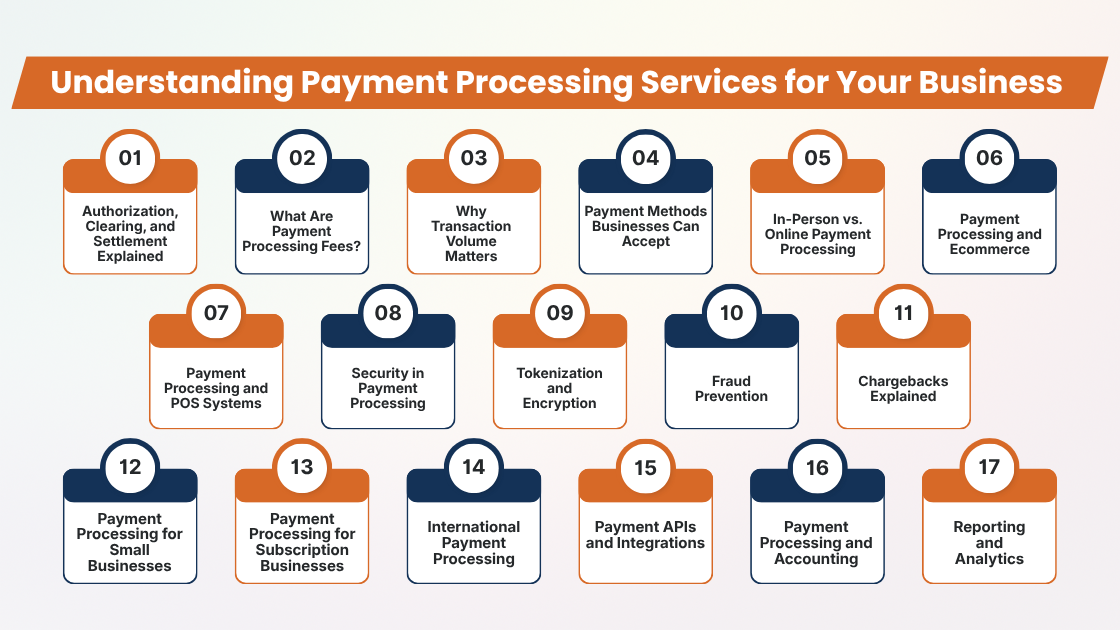
1. Authorization, Clearing, and Settlement Explained
Understanding authorization, clearing, and settlement helps business owners see what happens after a customer submits a payment. Although these phases are closely connected, each serves a different purpose.
1. Authorization
Authorization determines whether a payment should be approved or declined. The issuing bank reviews the transaction and returns an authorization response. An approval allows the transaction to continue. If the payment gets authorized does not mean that the merchant has already received the funds.
2. Clearing
Clearing involves exchanging transaction information among the participating parties. The transaction details are processed and recorded for reconciliation. This phase prepares the transaction for final settlement.
3. Settlement
Settlement involves transferring the funds through the relevant financial institutions. The merchant receives the proceeds as per the provider’s settlement schedule. Understanding these phases helps businesses interpret payment reports and manage cash flow more accurately.
Also Read: How Businesses Accept Credit Card Payments Online
2. What Are Payment Processing Fees?
Payment processing fees are the expenses businesses pay to accept electronic payments. The total expense can vary based on the payment processor, payment method, transaction volume, business type, and pricing agreement. Businesses should therefore examine the complete fee structure instead of focusing on a single advertised rate.
Common payment-processing costs may include:
- Percentage-based processing fees
- Per-transaction charges
- Interchange-related costs
- Network assessment fees
- Monthly account or platform fees
- Payment gateway fees
- Hardware charges
- Chargeback fees
- Refund-related charges
- International transaction fees
- Currency-conversion costs
Percentage-Based Fees
Some providers charge a percentage of each transaction. As the transaction value increases, the percentage-based portion of the processing cost also increases.
Per-Transaction Fees
A processor may charge a fixed amount for every payment. Businesses should consider their average transaction value while comparing pricing structures.
Monthly and Hardware Fees
Some services include recurring platform or account charges. Businesses may also pay for terminals, POS devices, or other payment hardware.
Additional Charges
Other costs can apply to refunds, chargebacks, international transactions, or specialized services. Reviewing all applicable fees helps businesses to estimate their actual payment-processing expenses more accurately.
3. Why Transaction Volume Matters
Transaction volume plays an important role in understanding the actual expenses of payment processing. A pricing model that works well for one business may not be equally suitable for another.
Businesses should go look beyond the advertised rate and consider how often customers make purchases and how much they usually spend. The combination of transaction frequency and average ticket size can highly affect monthly processing expenses.
For instance, Business A may process 10,000 transactions each month with a low average transaction value, while Business B processes only 1,000 transactions but handles much larger purchases. Their costs can vary based on the processor’s percentage rates, per-transaction fees, and other charges.
Businesses should evaluate:
- Monthly transaction count to understand payment frequency.
- Average transaction value to estimate typical customer spending.
- Total monthly processing volume to calculate overall payment activity.
- Card-present transactions for in-person payments.
- Card-not-present transactions for online or remote purchases.
- International transactions that may involve additional costs.
- Recurring payments that can create regular processing activity.
Analyzing these factors helps businesses to estimate payment processing expenses more accurately and choose pricing that matches their actual payment patterns.
Also Read: Mobile Credit Card Processing Guide for Field Businesses
4. Payment Methods Businesses Can Accept
Payment processors can support different payment methods, allowing businesses to serve customers with varying payment preferences. Choosing the right combination can make checkout more convenient and support different sales channels.
Businesses should consider the following payment methods:
- Credit Cards: Credit cards remain a widely used option for purchases, both online and in physical stores.
- Debit Cards: Debit cards allow customers to pay using funds connected to their bank accounts.
- Digital Wallets: Wallets can simplify checkout by using stored payment credentials. Common examples include Apple Pay, Google Pay, and PayPal.
- ACH Payments: ACH payments move funds electronically through the U.S. banking system and can be useful for invoices, subscriptions, and business-to-business transactions.
- Bank Transfers: Direct bank payments may be suitable for businesses that regularly receive larger or account-based payments.
- Recurring Payments: Subscription-based businesses can use recurring billing to collect scheduled payments automatically.
- Supported Payment Methods: Businesses should verify which payment options the processor supports and whether each method has separate transaction, processing, or monthly fees.
5. In-Person vs. Online Payment Processing
1. In-Person Payments:
Physical businesses may need POS terminals, contactless and chip-card acceptance, mobile wallets, printed or digital receipts, employee permissions, and POS integrations. These tools can help businesses to manage customer payments efficiently at the point of sale.
2. Online Payments:
Ecommerce businesses may require hosted checkout pages, payment APIs, fraud detection, tokenization, saved payment methods, recurring billing, and ecommerce integrations. These features can support secure and convenient online transactions while connecting payments with other business systems.
3. Mobile and Multi-Channel Payments:
Businesses operating through mobile applications may use payment SDKs or APIs to connect payment functionality directly to their apps. Companies selling through physical and digital channels may benefit from connected payment systems that manage transactions across different sales environments.
Also Read: Best Credit Card Processing Solutions for Small Businesses
6. Payment Processing and Ecommerce
For ecommerce businesses, payment processing and checkout design work closely together. A well-integrated payment system should make purchasing simple while supporting security, reliability, and efficient order management.
Businesses should evaluate whether the payment solution works smoothly with their website and ecommerce platform.
Important considerations include:
- Mobile-friendly checkout: Ensure customers can complete payments easily on smartphones and tablets.
- Multiple payment methods: Support cards, digital wallets, bank-based payments, and other relevant options.
- Secure payment pages: Protect customer payment information during checkout.
- Fraud controls: Use tools designed to identify and manage potentially fraudulent transactions.
- Refund functionality: Make refunds easier to process and track.
- Order-management integration: Connect payments with orders and customer records.
- Recurring billing: Support scheduled payments for subscription-based services.
- Reporting: Provide transaction and payment data for business monitoring.
Businesses should also understand their security responsibilities when payment processing is outsourced.
7. Payment Processing and POS Systems
A POS system can connect payment acceptance with essential business operations, helping businesses to manage transactions and sales activities from one platform.
For physical stores, restaurants, and other businesses, reliable integration between payment processing and POS software can simplify daily operations.
A POS system may combine:
- Payment processing for accepting customer transactions.
- Product catalogs for managing available products and services.
- Inventory management for monitoring stock levels.
- Sales reporting for reviewing transaction performance.
- Employee management for controlling staff access and permissions.
- Receipts for providing customers with transaction records.
- Customer information for maintaining relevant purchase details.
- Refunds for processing returned purchases.
Payment terminals are also an essential part of the payment environment. Based on their configuration and use, businesses may need to consider applicable PCI DSS requirements while managing these devices and connected systems.
8. Security in Payment Processing
Security is an essential consideration while choosing payment processing services because payment systems may handle sensitive account information.
Businesses should evaluate the security measures provided by their payment processor and understand which responsibilities remain with them.
Common security practices include:
- Encryption: Helps protect payment information while it is transmitted or stored.
- Tokenization: Replaces sensitive payment data with tokens that can reduce exposure of account information.
- Authentication: Helps verify users and prevent unauthorized access.
- Fraud monitoring: Identifies potentially suspicious payment activity.
- Access controls: Restrict sensitive systems and information to authorized personnel.
- Secure payment pages: Help protect customer information during checkout.
- Network security: Supports protection of connected payment infrastructure.
- Regular assessments: Help identify security weaknesses and support ongoing compliance.
PCI DSS establishes technical and operational requirements for protecting payment account data. Outsourcing processing does not automatically remove a business’s responsibilities.
Also Read: How Long Credit Card Transactions Take to Process: A Complete Guide for Businesses
9. Tokenization and Encryption
Encryption and tokenization are important technologies used to protect sensitive payment information. Although both technologies support payment security, they work in different ways.
Understanding these concepts can help businesses to evaluate how payment providers handle customer account data.
- Encryption: Encryption converts information into an encoded format which will be difficult for unauthorized parties to decode. This can help to protect payment information while data is transmitted or stored.
- Tokenization: Tokenization replaces sensitive payment information with a unique token. Authorized systems can use the token for payment-related activities without repeatedly exposing the original payment credentials.
- Reduced data exposure: Both encryption and tokenization can help to reduce the exposure of sensitive payment information within business systems.
- Provider responsibilities: Businesses should inquire payment providers about the way information is protected, where sensitive data is processed or stored, and which security responsibilities remain within the merchant.
10. Fraud Prevention
Fraud can result in financial losses, additional operational expenses, and customer service challenges. Payment processors may provide different tools to help businesses to identify and manage suspicious transactions. Businesses should configure these controls as per their transaction patterns and risk factors.
Common fraud-prevention tools include:
- Address verification: involves address verification by comparing billing information with available records.
- Card security checks: Help identify potentially unauthorized card transactions.
- Velocity controls: Monitor repeated transactions within a specific period.
- Risk scoring: Assigns risk indicators to transactions based on selected factors.
- Transaction monitoring: Helps identify unusual payment activity.
- Device analysis: Examines device-related signals associated with transactions.
- 3-D Secure: Adds an authentication step that can help verify customers.
- Rules-based screening: Applies predefined rules to identify potentially suspicious payments.
No single tool removes fraud risk. Businesses should consider transaction types, order values, customer locations, industry characteristics, and past fraud patterns while establishing controls.
11. Chargebacks Explained
A chargeback happens when a card transaction is disputed through the cardholder’s financial institution and the payment is reversed through the applicable dispute process.
Chargebacks can create several costs:
- Lost transaction revenue
- Product or service losses
- Administrative work
- Dispute fees
- Potential operational consequences
Businesses should therefore check the provider’s chargeback management tools. While evaluating chargeback management tools, useful capabilities to verify include:
- Dispute notifications
- Evidence management
- Transaction records
- Automated alerts
- Reporting
- Documentation tools
Businesses maintaining accurate transaction records can make dispute management more organized.
Also Read: Credit Card Processing Fees: Complete Breakdown for Businesses
12. Payment Processing for Small Businesses
Small businesses often need payment solutions that are simple to set up, affordable to operate, and suitable for everyday transactions. The right system should match the business’s sales channels and operational needs instead of focusing only on advertised rates.
Important considerations include:
- Simple pricing: Understand processing and additional fees.
- Easy onboarding: Look for straightforward account setup.
- POS compatibility: Ensure payments work with existing systems.
- Mobile payments: Support convenient customer payment options.
- Online payment links: Make remote payment collection easier.
- Invoicing: Connect invoices with payment collection when possible.
- Reporting: Access useful transaction and sales information.
- Customer support: Consider available assistance when problems occur.
- Hardware availability: Check whether suitable terminals and accessories are provided.
Businesses should compare total costs, features, support, contract terms, and operational requirements before choosing a payment processor.
13. Payment Processing for Subscription Businesses
Subscription businesses process payments regularly, creating requirements more than one-time purchases or transactions. A suitable payment system should support recurring billing while helping businesses to manage failed payments and customer accounts efficiently.
Key features may include:
- Recurring billing: Automatically collects scheduled subscription payments.
- Payment retries: Attempts to recover failed transactions.
- Card updates: Allows customers to update expired or replaced payment cards.
- Subscription management: Helps manage plans, billing cycles, and cancellations.
- Customer notifications: Sends payment and billing-related updates.
- Refund handling: Supports refunds when required.
- Billing reports: Provides information about recurring transactions and payment activity.
Businesses should review the way providers handle declined recurring payments and expired payment methods to reduce the interruptions to subscription revenue.
14. International Payment Processing
Businesses selling internationally need payment solutions that support multiple currencies, countries, and customer preferences. Before choosing a provider, businesses should review:
- Currency conversion and international payment methods
- Cross-border support and fraud controls
- Country-specific requirements
- Transparent pricing
International transactions may involve additional fees, so businesses should compare conversion charges, supported countries, and cross-border costs before choosing a processor.
15. Payment APIs and Integrations
Payment APIs help businesses to connect payment services with their existing software and create customized payment workflows. They can support websites, mobile apps, ecommerce platforms, accounting systems, CRM tools, POS software, and subscription platforms.
Developers should evaluate:
- API documentation and SDK availability
- Programming-language support
- Webhooks and sandbox environments
- Authentication and error handling
- Reporting APIs and testing tools
- Technical support
A payment provider with suitable integration capabilities can simplify development and support specialized business requirements.
Also Read: Top Payment Processing Companies in the USA
16. Payment Processing and Accounting
Payment processing should integrate smoothly with accounting systems to reduce manual work and improve financial recordkeeping. Connected systems can make transaction tracking, reconciliation, and reporting more efficient.
Useful features include:
- Automated transaction records
- Payment reconciliation
- Refund and invoice tracking
- Revenue and payout reports
- Tax-related reporting
- Accounting integrations
When payment and accounting systems work together, businesses can reduce duplicate data entry, simplify payment reconciliation, and maintain more consistent financial information.
17. Reporting and Analytics
Payment reports provide valuable information about transaction activity and can help businesses to track payment performance.
Based on the provider, businesses may analyze:
- Payment volume and transaction counts
- Failed payments, refunds, and chargebacks
- Payment methods and payouts
- Locations and sales channels
Such insights can help to identify operational problems and understand customer payment behavior. Centralized reporting is especially useful for businesses managing multiple locations or sales channels.
Conclusion
Payment processing is an essential part of running a modern business, whether customers pay in person, online, through mobile applications, or through recurring billing.
Choosing a payment processor requires more than comparing advertised transaction rates. Businesses should consider payment methods, transaction volume, security, fraud prevention, POS compatibility, ecommerce integrations, international payments, reporting, and accounting connections.
Understanding the complete pricing structure is equally important. Fees can vary based on payment methods, transaction types, sales channels, and other services. Businesses should also review contract terms, hardware costs, support, and security responsibilities before making a decision.
A suitable payment processing solution should fit the business’s current operations while supporting future growth. By comparing features, costs, security measures, integrations, and service requirements, business owners can better understand their options and select payment infrastructure that supports efficient transactions and reliable day-to-day operations.
If you still have any query about Payment processing services explained for business owners then you may free demo at AcePay and we are more than happy to assist you.