The way customers make payments for products and services is quickly changing. Mobile payment processing has become an important way to make payments in restaurants or retail businesses.
Customers increasingly expect fast, secure, and convenient payment options that let them complete payments using their mobile phones, contactless cards, digital wallets, and mobile point-of-sale(POS)systems.
For restaurants, mobile payments simplify table-side transactions, takeaway orders, and online food purchases, while retailers can use mobile payments to speed up checkout, reduce queues, and improve the shopping experience of customers.
Businesses implementing mobile payment solutions can accept several digital payment methods, process transactions efficiently, and offer more payment flexibility to customers.
Modern technologies like Near Field Communication(NFC), QR code payments, Apple Pay, and Google Pay are making cashless transactions more accessible.
However, choosing the right payment processing system needs businesses to consider different aspects like transaction fees, payment security, PCI DSS compliance, integration capabilities, and customer convenience.
While platforms like AcePay helps businesses to accept payments smoothly and also improve management of payment transactions.
Whether you run a small restaurant, a retail store, or a multi-location business, it is essential to understand mobile payment technology as it helps to improve operational efficiency, improve customer satisfaction, and support long-term business growth.
Also Read: What Is a Payment Processing Platform and How Does It Work?
Mobile Payment Processing: Features, Benefits, and Solutions
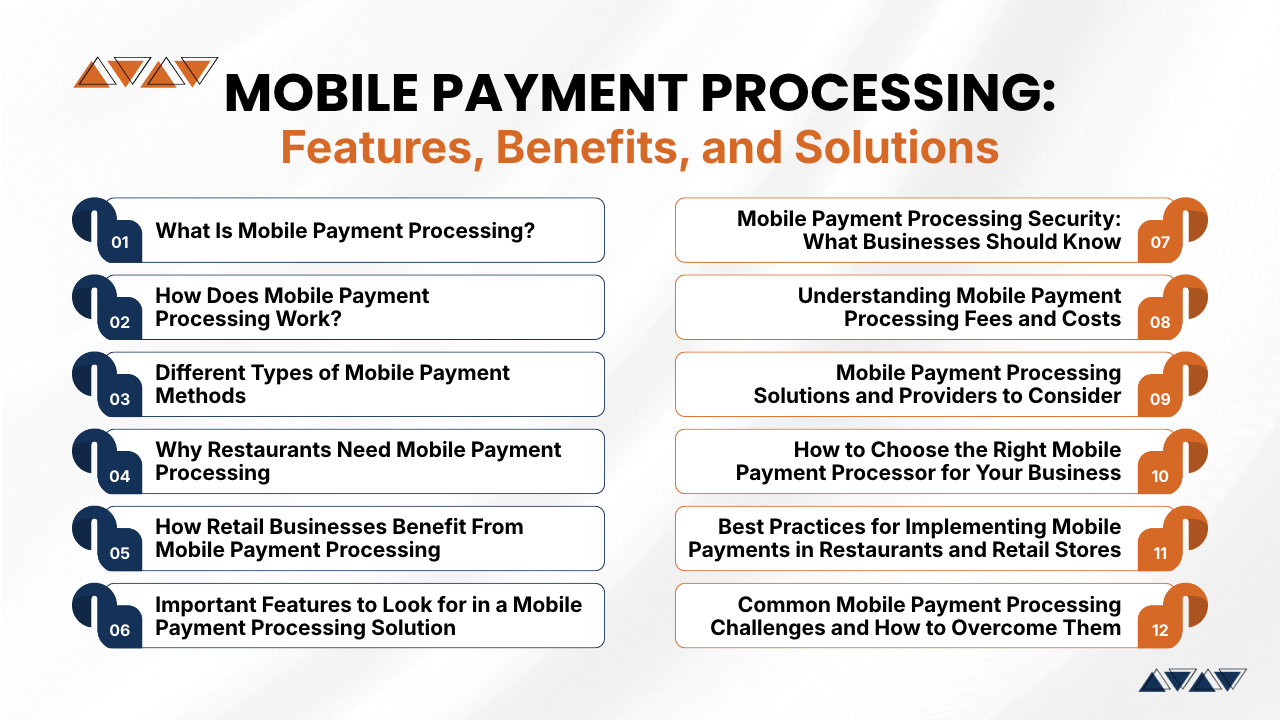
1. What Is Mobile Payment Processing?
Mobile payment processing involves the technology and services that enable businesses to accept, authorize, and manage customer payments through mobile devices.
With mobile payment systems, businesses do not need to use fixed checkout terminals, rather customers can use their mobile phones, tablets, wireless card readers, and mobile point-of-sale(POS)systems to complete payment transactions quickly and conveniently.
Customers can make payments using debit and credit cards, digital wallets, QR codes, and other supported payment methods. The payment processor securely transmits transaction details and communicates it to the valid financial institutions, where the transactions either get approved or declined.
For instance, a retail staff member can accept a contactless card payment anywhere inside a store, while restaurant servers can offer mobile POS devices on customer’s tables. Such systems remove the need for customers to go to the cashier and make payments which also improves the overall payment experience.
Most businesses like restaurants, retail stores, grocery shops, food trucks, beauty salons, pop-up vendors, and delivery services can all use mobile payment solutions to accept payments quickly and conveniently.
Offering flexible payment solutions, lets businesses reduce checkout delays, improve customer convenience, and manage transactions more efficiently.
2. How Does Mobile Payment Processing Work?
It is essential for businesses to understand the mobile payment processing transaction process as it helps business owners to understand the technology involved and identify what they require while choosing a payment provider.
A usual mobile payment transaction involves several phases:
Step 1: Customer selects a payment method
Customers choose products or while completing a restaurant order and choose to make payments as per their preferences. They may make payments by using a debit card, credit card, digital wallet, or QR-based payment option.
Step 2: Payment information is captured
The payment terminal or mobile application collects the transaction details. Depending on the technology, collection of payment details may happen either through NFC contactless communication, a card chip, a magnetic stripe, or a QR code.
Step 3: Information is securely transmitted
The payment system then sends the transaction request to the payment processor online. While security features help to protect sensitive payment details during transmission.
Step 4: Payment authorization takes place
The processor routes the request through the appropriate payment network to the issuing bank of the customer. The issuing bank checks the transaction and determines if the transactions can be approved.
Step 5: The payment result is communicated
Once the issuing bank approves the payment, the confirmation is sent back to the payment system, letting businesses to finalize the transaction and complete the customer’s order.
Step 6: Funds are settled
Transactions that are approved moves to the settlement process. Then the payment provider coordinates the transfer of funds to the merchant’s designated bank account as per the bank’s settlement duration and applicable banking procedures.
Step 7: Transaction records are updated
The payment system then records the transaction, allowing businesses to manage sales reports, refunds, reconciliation, and accounting.
Although customers may complete a contactless payment within seconds, several banks and systems work together behind the scenes.
Also Read: Payment Processing Services Explained for Business Owners
3. Different Types of Mobile Payment Methods
Restaurants and retailers can offer several mobile payment methods that make transactions fast, simple, and convenient. If restaurants and retail stores support different payment options can help businesses to meet customer preferences and also improve the checkout experience.
- Digital Wallets: Digital wallets like Apple Pay, Google Pay, and Samsung Wallet allow customers to make payments using mobile phones or smart watches. These payment methods often use tokenization and device authentication features to secure payment information.
- Near-Field Communication (NFC) Payments: NFC technology lets customers make payments by tapping a contactless card using a mobile phone or smartwatch through a payment terminal.
- QR Code Payments: Customers may make payments using QR code payments by using a payment application or scanning code through mobile camera to open a payment page. Restaurants can display QR codes on tables, while retailers can use QR code payments for in-store or remote payments.
- Contactless Card Payments: Customers may make payments using contactless card payments like debit and credit cards when customers can tap their cards against payment terminals rather than inserting or swiping them.
- Payment Links: Businesses can send secure payment links to customers either through emails or text messages. Such payment links are beneficial for restaurant reservations, catering deposits, delivery orders, and remote retail purchases.
- In-App Payments: Mobile applications let customers complete purchases within the app. Such payments let restaurants to support food ordering, while retailers can offer convenient shopping and repeat purchases.
Offering these payment options lets businesses create a flexible and convenient payment experience.
4. Why Restaurants Need Mobile Payment Processing
Restaurants handle multiple tasks simultaneously. Whether taking orders, preparing meals, serving guests, and managing payments. Traditional checkout systems can cause payment delays while customers may need to wait for staff or visit a fixed payment counter.
Mobile payment processing offers more flexibility and helps restaurants to improve daily operations.
Key benefits include:
- Faster Table-Side Payments: Servers can offer mobile POS devices directly to customers, allowing staff members and managers to review bills and complete payments without leaving their tables.
- Better Customer Experience: It allows customers to make payments conveniently reducing the need to unnecessarily wait and create a smooth dining experience during busy service hours.
- Easy Bill Splitting: Many mobile POS systems allow customer groups to divide bills among several guests which makes payments simpler for families and friends.
- Convenient Takeaway and Delivery Payments: It allows restaurants to accept digital payments for online orders, takeaway purchases, and delivery services.
- Improved Staff Productivity: It lets staff members process payments near customers instead of repeatedly walking to a checkout counter.
- Flexible Payment Acceptance: Mobile payment systems lets food trucks, outdoor dining spaces, catering services, and temporary food stalls accept payments without fixed terminals.
- Simplified Transaction Management: Integrating mobile payments with restaurant POS software helps to synchronize orders, bills, and payment records supporting more efficient operations.
Also Read: How to Choose the Right Credit Card Processing Company for Your Business
5. How Retail Businesses Benefit From Mobile Payment Processing
One of the biggest challenges faced by retail businesses include long checkout queues, overcrowded counters, product returns, inventory management.
While mobile payment systems lets retailers overcome these challenges by making transactions more flexible and improving the overall shopping experience.
Key benefits include:
- Checkout Anywhere in the Store: Staff members can use mobile POS devices to directly accept payments on the sales floor removing the need for customers to visit a checkout counter.
- Reduced Waiting Times: Offering mobile payment checkout options helps retailers to manage a high number of customers during holidays, seasonal sales, and promotional events.
- Better Customer Assistance: It helps staff members to assist shoppers with product inquiries, verify availability of stock, and process transactions without interrupting the shopping experience.
- Flexible Selling Locations: retailers can accept payments at exhibitions, trade shows, outdoor markets, and temporary stores without installing permanent terminals.
- Simplified Returns and Refunds: Integrated transaction records help staff members to find past purchases and process refunds or exchanges more efficiently.
- Improved Inventory Management: It connects mobile POS systems with inventory software that helps to update stock levels instantly after every completed purchases.
- Unified Sales Management: retailers operating physical stores and ecommerce websites can use integrated payment solutions to manage transactions across several sales channels.
These benefits help retailers to improve service quality, streamline operations, and offer convenient payment experiences to customers.
6. Important Features to Look for in a Mobile Payment Processing Solution
Choosing the right mobile payment processing solution businesses requires evaluating features that support daily business operations, secure customer information, and simplify transaction management. Restaurants and retailers should compare important features before making a decision.
- Multiple Payment Methods: Choose a payment solution that accepts credit cards, debit cards, contactless payments, digital wallets, QR codes, and popular local payment methods which allows customers to make payments using their preferred payment method.
- POS Integration: Businesses must ensure that the payment system integrates with your existing point-of-sale(POS)software. Because restaurants may need to integrate table and menu management while retailers may need to integrate product and inventory synchronization.
- Transaction Reporting: Businesses must ensure that the payment processing systems offer detailed reports of sales,refunds, payment methods, settlements, and daily transaction activity. These insights help business owners to track financial performances.
- Security and Fraud Prevention: Businesses must evaluate security and fraud prevention measures provided by businesses which includes features like encryption, tokenization, secure authentication, fraud monitoring, and compliance with applicable payment security standards which includes PCI DSS.
- Fast and Reliable Processing: Choose a system that processes transactions consistently during busy periods. Reliable connectivity and clear payment confirmations help prevent confusion and duplicate charges.
- Refund and Cancellation Management: The solution should provide tools for handling cancelled orders, customer returns, refunds, reversals, and payment disputes.
- Settlement and Reconciliation: Check settlement timelines and ensure transaction reports can be matched easily with bank deposits. This simplifies bookkeeping and financial management.
- Scalability: Select a platform that can accommodate additional terminals, employees, business locations, and increasing transaction volumes as your organization expands.
- Customer Support: Reliable technical assistance is important when payment terminals experience connectivity problems or transactions fail. Check support availability, response times, and troubleshooting options.
- Transparent Pricing: Review transaction charges, monthly fees, hardware costs, setup expenses, and additional service charges before choosing a provider.
Evaluating all these features helps businesses to choose a reliable payment solution that supports efficiency, security, and long-term business growth.
Also Read: Top Payment Processing Companies in the USA
7. Mobile Payment Processing Security: What Businesses Should Know
One of the important aspects that restaurants and retailers need to check while choosing a mobile payment processing system is Payment security.
Securing customer financial information helps businesses to prevent chances of fraud, or any unauthorized access, and data breaches and also build customer trust.
Businesses should consider the following security measures while choosing and managing a mobile payment system.
- Encryption: Encryption protects sensitive payment information when it is transmitted between mobile devices, payment terminals, and processing systems.
- Tokenization: Tokenization replaces actual card details with substitute values, reducing the exposure of sensitive card information during transactions.
- PCI DSS Compliance: Businesses must choose payment providers that support Payment Industry Data Security Standard(PCI DSS) requirements.
- Authentication Controls: Businesses must use strong passwords, device authentication, restrict staff permissions, and secure administrative access to avoid unauthorized system usage.
- Fraud Detection: Businesses must ensure that available fraud monitoring tools are able to identify suspicious transactions, unusual payment patterns, and any unauthorized activities.
- Secure Network Connections: Connect payment devices through trusted networks, avoid unsecured public Wi-Fi, and regularly update payment applications and device software.
- Employee Training: Train staff to recognize suspicious transactions, protect customer information, handle payment devices correctly, and follow proper refund procedures.
- Regular Security Updates: Keep operating systems, payment applications, and POS software updated to address known vulnerabilities and improve system protection.
Mobile payment security needs good coordination between payment providers and businesses. Businesses by combining reliable technology with strong internal procedures helps to protect transactions and maintain customer trust.
8. Understanding Mobile Payment Processing Fees and Costs
Mobile payment processing fees directly influence business costs and profits. Restaurants and retailers should understand the complete pricing structure before choosing a payment provider. Important costs include:
- Transaction Fees: Charges applicable for individual payments that may differ based on card type, payment method, and processing model.
- Monthly Service Fees: Monthly service charges applicable for payment software, POS features, reporting tools, and customer support.
- Hardware Expenses: Costs of purchasing or renting mobile card readers, wireless terminals, tablets, and compatible devices.
- Setup and Integration Charges: Costs for installing, technical configuration, and connecting payment systems with existing business software.
- Chargeback Fees: Extra charges applicable when customers dispute transactions.
- International Transaction Fees: Extra costs for processing eligible international cards and converting currencies.
- Refund Charges: Some providers retain certain processing fees when businesses refund customer payments.
- Cancellation Fees: Early termination charges may apply when ending a service agreement before its completion.
Compare transaction rates, recurring expenses, settlement timelines, and contract conditions. Understanding the total cost helps businesses select a suitable payment solution while avoiding unexpected charges.
Also Read: Credit Card Processing for Small Business: Complete Beginner’s Guide
9. Mobile Payment Processing Solutions and Providers to Consider
Choosing a suitable mobile payment processing provider should be based on business requirements, transaction volume, payment preferences, and software compatibility.
Below are some providers worth considering:
- Acepay: Businesses can evaluate Acepay for their payment processing requirements. But before choosing AcePay, businesses must review supported payment methods, POS compatibility, mobile payment capabilities, transaction fees, settlement schedules, security measures, and customer support.
- Square: Square offers payment processing tools, POS software, and compatible hardware for restaurants, retailers, and small businesses. It supports in-person sales and helps them to manage everyday transactions.
- Shopify POS: Shopify POS connects physical retail operations with Shopify’s ecommerce platform. It helps retailers manage products, inventory, customer information, and sales across online and in-store channels.
- Stripe: Stripe provides payment processing infrastructure, APIs, and integration options for businesses handling online transactions, mobile applications, and customized checkout experiences.
- PayPal: PayPal supports digital payments, online checkout, and payment links, making it an option for businesses accepting payments through supported digital channels.
- Oracle Payments: Oracle offers restaurant-based payment and POS solutions through its technology ecosystem supporting integrated payment workflows, contactless transactions, and centralized reporting.
Before selecting a provider, compare pricing, supported features, integration requirements, regional availability, and customer support to identify the solution that best matches your business operations.
10. How to Choose the Right Mobile Payment Processor for Your Business
Choosing the right mobile payment processor needs them to evaluate business needs, customer preferences, expenses, and technology requirements.
Consider these important factors before making a decision:
- Understand Business Requirements: Restaurants may require features like table-side payments, bill splitting, while retailers may require mobile checkout and inventory integration.
- Check Payment Methods: Choose a processor that supports common payment methods like credit cards, debit cards, digital wallets, contactless payments, and valid local payment options.
- Compare Pricing: Review transaction fees, monthly charges, hardware expenses, setup costs, refund policies, and other applicable fees.
- Verify Software Compatibility: Ensure the payment system integrates with your existing POS, accounting, ecommerce, and inventory software.
- Evaluate Reliability: Check transaction speed, connectivity requirements, system availability, and technical support.
- Review Security: review security features like encryption, fraud prevention, PCI DSS responsibilities, and customer data protection measures.
- Test Before Purchasing: Businesses can request a demo to check payment acceptance, refunds, reporting, and reconciliation.
- Consider Scalability: Businesses must choose a solution that supports additional terminals, locations, staff, and high transaction volume as your business grows.
11. Best Practices for Implementing Mobile Payments in Restaurants and Retail Stores
For implementing mobile payment systems successfully, accurate equipment, and proper staff training. Before using a new payment system, businesses must review their existing payment processes to find if there are any checkout delays, transaction problems, and customer preferences.
Businesses must choose smartphones, tablets, wireless card readers, or mobile POS terminals based on your operational requirements.
Configure the payment software and connect it with existing POS, inventory, accounting, or restaurant ordering systems if necessary. Then, test different transactions, including table-side payments, takeaway orders, and in-store purchases, to ensure everything works accurately.
Staff training is also equally important. Teach staff members the way to accept payments, confirm transactions, issue receipts, process refunds, and handle common mistakes. Display accepted payment methods, QR codes to inform customers about available options.
Businesses must start introducing the payment system gradually with selected checkout areas before expanding your business. Finally, track transaction failures, processing times, customer feedback, settlement records, and security updates. These practices help to improve efficiency of payments and create a convenient experience to customers.
Also Read: Mobile Credit Card Processing Guide for Field Businesses
12. Common Mobile Payment Processing Challenges and How to Overcome Them
Although mobile payments have several benefits, businesses may face many operational and technical challenges.
- Internet Connectivity Issues: Maintain a stable internet connection and check if the payment provider supports secure offline payment features.
- Transaction Failures: Train staff members to identify declined or incomplete payments and verify transaction status before retrying.
- Integration Difficulties: Confirm that the payment system works with existing POS, inventory, and accounting software before implementation.
- Employee Resistance: Provide practical training and clear instructions to help staff become comfortable using mobile payment technology.
- Unexpected Costs: Review transaction charges, subscription fees, hardware expenses, and other costs before selecting a provider.
- Security Risks: Protect payment devices with strong passwords, restricted access, regular updates, and secure network connections.
- Technical Problems: Keep devices updated and establish a support process for resolving software or hardware issues quickly.
Addressing all these challenges helps restaurants and retailers to maintain smooth payment operations and deliver a reliable customer experience.
Conclusion
Mobile payment processing for restaurants and retail businesses has become essential for creating convenient shopping experiences and managing everyday transactions.
Adopting technologies like contactless cards, digital wallets, QR code payments, and mobile POS systems, businesses can simplify checkout procedures, reduce waiting times, and offer customers greater payment flexibility.
Restaurants can improve table-side service, manage takeaway payments, and streamline billing, while retailers can process purchases across the sales floor and maintain better inventory visibility.
However, choosing the right payment processing provider requires careful consideration of transaction fees, security features, POS integration, settlement schedules, and customer support.
Solutions such as Acepay, along with other established payment providers, can be evaluated based on their available services and compatibility with business requirements.
Investing in a reliable payment system also helps improve transaction management, financial reporting, and operational efficiency.
Ultimately, the right mobile payment processing solution enables restaurants and retailers to serve customers more effectively, adapt to changing payment preferences, and support sustainable business growth.
If you still have any query about Mobile Payment processing for restaurants and retail then you may book a free demo at AcePay and we are more than happy to assist you.