An effective Ecommerce Payment Processing Setup Guide helps businesses to know the way to accept online payments securely, efficiently, and conveniently.
It is essential for businesses to set up a reliable ecommerce payment processing system for creating a smooth shopping experience, building customer trust, and managing transactions successfully.
Whether you run a small online store or a growing ecommerce business, it is essential to choose the right payment gateway, payment processor, and integration method as it directly impacts your store’s performance.
Having a well-configured online payment system allows customers to make payments using credit cards, debit cards, digital wallets, and other supported payment methods.
Setting up a payment processing goes beyond a payment button on the website. Businesses must check payment processing fees, compare providers, configure merchant accounts whenever required, and ensure compliance with PCI DSS security standards.
Implementing strong payment security, fraud prevention tools, and reliable transaction verification helps businesses to protect sensitive customer information.
On top of that, improving the ecommerce checkout process reduces the chances of customers abandoning carts and also improves conversion rates.
This blog will walk you through the important steps for setting up online payment processing, whether it is choosing a suitable provider or integrating the payment gateway, or testing transactions and tracking performance.
Also Read: Online Payment Processing for Ecommerce Stores
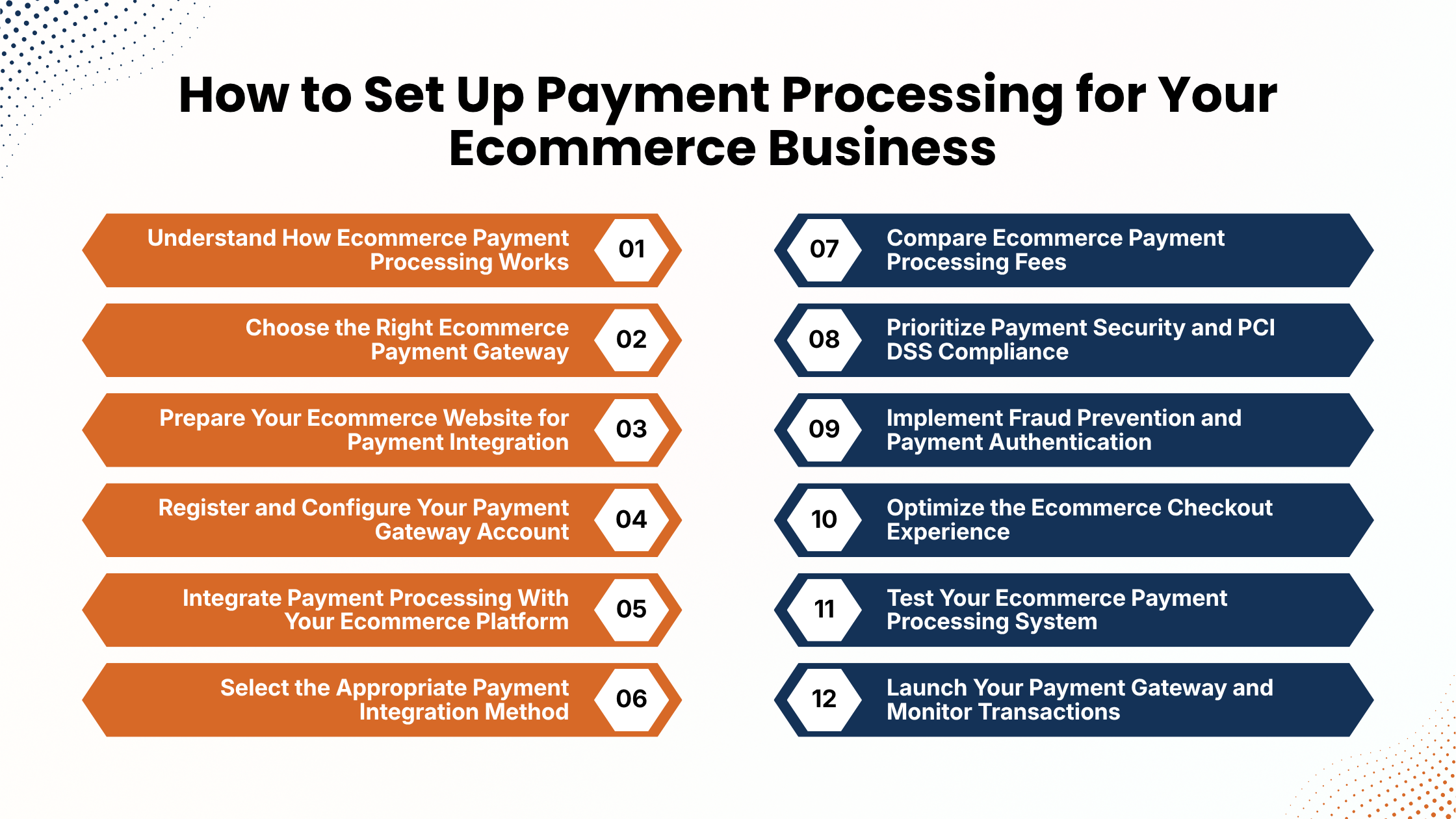
How to Set Up Payment Processing for Your Ecommerce Business
To run an ecommerce business successfully, it is essential to set up a reliable payment system. Today customers expect to make payments as per their convenience, secure transactions, transparent pricing, and a smooth checkout process while purchasing products online.
Because if customers find the payment process to be complex or unreliable then there are high chances that shoppers may abandon their carts and choose your competitors instead.
Setting up an ecommerce payment processing setup effectively allows businesses to accept online payments, manage transactions, process refunds, and track incoming revenue.
However, establishing a payment system involves businesses making many essential decisions like choosing the right payment gateway, comparing processing fees, integrating payment solutions, and implementing appropriate security measures.
Whether you run a Shopify store, a WooCommerce website, or a custom ecommerce platform, it is essential to understand the setup process because it can help to build an efficient payment infrastructure.
This blog will walk you through essential steps to setting up ecommerce payment processing from choosing a provider and configuring your account to securing transactions, testing payments, and tracking performance.
1. Understand How Ecommerce Payment Processing Works
Before setting up an online payment system, businesses must understand the way payment processing works. Ecommerce payment processing has several connected components working together to authorize transactions, securely transfer payment information, and facilitate the settlement of funds into a bank account.
The main components include:
- Payment gateway: A payment gateway securely collects and transmits payment information between the checkout and payment processing infrastructure.
- Payment processor: A payment processor routes transaction information between financial institutions and payment networks.
- Merchant account: It is a dedicated account that may receive card transaction funds before they reach the business bank account.
- Issuing bank: It is the customer’s bank that checks available funds or credit and approves or declines the transaction.
- Payment network: Payment networks like Visa and Mastercard facilitate communication between financial institutions.
An online transaction begins with a customer adding products to the shopping cart and proceeds to checkout. Then the customer chooses a payment method and submits the payment information.
The payment gateway securely transmits the transaction details to the processor, which routes the request to the valid financial institution. The issuing bank then approves or declines the payment.
Once the payment status gets verified, then the ecommerce website updates the order. Approved transactions are then collected and settled as per the provider’s process and payout schedule.
Understanding these components is essential as it helps businesses to troubleshoot payment failures, maintain correct transaction records and choose appropriate payment solutions.
2. Choose the Right Ecommerce Payment Gateway
While establishing an online store, one of the most essential decisions to be made by businesses is to choose a suitable ecommerce payment gateway.
Because the provider that they choose influences transaction costs, payment success rates, security, and customer experience. Hence, it is essential for companies to compare several providers before making a decision.
Consider the following factors:
- Supported payment methods: It should support different payment methods like credit cards, debit cards, digital wallets, UPI, and net banking based on your customers’ preferences.
- Transaction fees: review and compare fees like percentage-based charges, fixed fees, international payment costs, and refund-related charges.
- Platform compatibility: Ensure the provider supports your ecommerce platform through plugins, extensions, hosted checkout, or APIs.
- Security features: Check for encryption, tokenization, authentication, and fraud detection capabilities.
- Settlement time: Understand when processed funds become available in your business bank account.
- International support: Consider multicurrency transactions and cross-border payment capabilities if you sell globally.
- Customer service: Evaluate technical documentation, support availability, and dispute resolution assistance.
Businesses should evaluate popular providers like Stripe, PayPal, RazorPay, PayU, Shopify Payments, and Authorize. Net, based on your location and business eligibility.
Businesses must compare pricing, supported payment methods, and integration requirements. The right payment provider should meet your current needs while supporting future business growth.
Also Read: Best Payment Processing Software for Businesses
3. Prepare Your Ecommerce Website for Payment Integration
Businesses before starting payment gateway integration must ensure that their ecommerce website is properly configured. Payment providers may review websites during account verification to understand your business activities and confirm that essential customer information is available.
Your website should include important business information, such as:
- Business contact details and customer support information.
- Shipping and delivery policies.
- Return, refund, and cancellation policies.
- Privacy policy and applicable terms and conditions.
- Accurate product descriptions, prices, and availability.
- Secure website access through HTTPS.
All these details help customers to understand their purchases and establish trust in your business. It is also essential to verify that your website works properly on mobile phones and tablets.
A responsive website design makes it easier for customers to browse products, enter payment details, and complete purchases. Preparing your website before integration helps to reduce onboarding delays and create a better checkout experience.
4. Register and Configure Your Payment Gateway Account
Once when your website is ready, register it with your selected payment provider and complete its business verification process. Most payment providers request for legal business name, business address, contact details, business type, identification documents, applicable tax information, and bank account details. Requirements differ based on the payment provider and jurisdiction.
The account configuration process generally includes:
- Create a business account through the provider’s official website.
- Enter your business and contact information.
- Submit the required identity and business verification documents.
- Complete the provider’s onboarding checks.
- Add your bank account for receiving settlements.
- Configure supported currencies and payment methods.
- Review transaction notifications, refund permissions, and fraud prevention settings.
Once your account is approved, ensure to explore the provider’s dashboard. They must learn the way to view transactions, track payment statuses, process refunds, and check settlement reports.
If there are API-based integrations, it is essential to conduct separate test and live credentials. During the testing, store secret API keys securely on the server and never expose them on public repositories. Proper account configuration establishes the foundation for reliable payment processing.
5. Integrate Payment Processing With Your Ecommerce Platform
The next step is connecting your payment provider to your ecommerce website. The process is based on whether you use Shopify, WooCommerce, or a custom-built platform.
- Shopify integration: In such integrations, users log in to their Shopify admin dashboard and open settings. Choose payments and review the providers available depending on your store’s country. Businesses can either activate Shopify Payments if eligible or choose a supported third-party provider. Then, follow the instructions to connect to your account, complete verification, and enable the required payment methods.
- WooCommerce integration: In such integrations, users must log in to their WordPress dashboard and install a trusted payment extension which is compatible with your selected provider. Then, activate the plugin, open WooCommerce payment settings, connect your account, and configure the available payment options.
- Custom website integration: Custom ecommerce websites can connect payment providers through hosted checkout pages, embedded payment components, or server-side APIs. For custom integrations, developers should create orders securely on the server, request payment sessions from the provider, and verify payment status before updating order records. Signed webhook should be implemented if supported to handle repeated notifications safely.
Choose an integration approach that matches with the website’s technical requirements and available resources.
Also Read: Modern Payment Processing Solutions for Growing Businesses
6. Select the Appropriate Payment Integration Method
Businesses can connect their ecommerce websites to payment providers through different integration methods. Every approach provides different levels of customization, flexibility, and technical responsibility.
- Hosted checkout: This method involves redirecting customers to a payment page which is managed by the provider. Such checkout is a good option for businesses needing a straightforward implementation without developing their own payment interface. It reduces the merchant’s direct exposure to sensitive card details.
- Embedded payment fields: These components let customers enter payment information within the store’s checkout while the fields having sensitive information are controlled by the payment provider. They can create a more consistent shopping experience.
- Direct API integration: Direct API integration gives developers more control over payment workflows, order management, and checkout customization.
However, implementing direct API integration needs technical expertise and more work for server-side validation, security, error handling, and maintenance.
For small businesses, implementing hosted checkout or established platform integration is beneficial. While growing businesses may prefer embedded components, complex ecommerce platforms may require custom API integrations. So, businesses must check implementation costs, security responsibilities, and customer experience before choosing a method.
7. Compare Ecommerce Payment Processing Fees
Comparing ecommerce payment processing fees is important for controlling business expenses and maintaining good profit margins. Different payment providers have different payment structures based on transaction amounts, payment methods, customer locations, and currencies. Understanding these costs helps businesses to select a payment solution suitable as per their budget and sales volume.
Common charges include:
- Transaction fees: Percentage-based charges applied to each successful payment.
- Fixed fees: Additional amounts charged per transaction.
- International payment fees: Extra costs for processing cross-border payments.
- Currency conversion fees: Charges for converting foreign currencies.
- Monthly fees: Recurring costs for certain payment plans.
- Chargeback fees: Charges associated with disputed transactions.
- Refund-related costs: Original processing fees may not always be refunded.
For instance, if your ecommerce store receives USD 2000 and the provider charges an illustrative rate of 2% plus USD 5, the percentage fee is USD 40, and the fixed fee is USD 5. Therefore the total processing cost is USD 45, leaving USD 1,955 before taxes and other charges.
So it is essential for businesses to compare pricing structures, settlement costs, and refund policies before choosing a provider. Having a transparent, cost-effective payment solution can help to reduce expenses and improve long-term profits.
8. Prioritize Payment Security and PCI DSS Compliance
Prioritizing payment security is essential for protecting customer information and maintaining customer trust. Customers share sensitive financial details during checkout, which makes it essential to avoid unauthorized access and payment data exposure.
PCI DSS compliance refers to the Payment Card Industry Data Security Standard that establishes security requirements for organizations that store, process, or transmit payment card information.
Follow these important security practices:
- Use HTTPS: Protect information exchanged between customers’ browsers and your website.
- Implement tokenization: Replace sensitive payment details with secure tokens where supported.
- Protect API credentials: Store secret keys securely and restrict access.
- Enable multi-factor authentication: Protect administrator accounts and payment dashboards.
- Limit stored payment information: Avoid collecting or storing sensitive card details unnecessarily.
- Update software regularly: Maintain current versions of your ecommerce platform, plugins, and payment integrations.
- Verify payment notifications: Authenticate webhook messages before updating transaction records.
Using a reputable payment gateway can help to reduce direct exposure to sensitive card information but it does not instantly remove every compliance requirement. Businesses must review the applicable PCI DSS requirements and consult a qualified security professional if necessary.
Also Read: How to Compare Payment Processing Providers
9. Implement Fraud Prevention and Payment Authentication
Online stores can experience fraud transactions, stolen payment credentials, account takeovers, and customer disputes. A reliable ecommerce fraud prevention strategy helps to identify suspicious activities and reduce financial losses.
Begin by reviewing the fraud detection features available through your payment provider. Many providers offer automated risk analysis tools that examine transaction patterns, billing details, device information, and other relevant signals.
Businesses must consider enabling additional authentication whenever appropriate. For instance, 3D Secure provides an additional authentication layer for supported card transactions. Its effect on fraud liability is based on applicable card network rules, transaction eligibility, and regional requirements.
Track unusual payment patterns, including repeated failed attempts, unusually large purchases, multiple cards used within a short period, and inconsistent billing information.
You should also maintain correct order confirmations, delivery records, and customer communications to help respond to chargebacks.
Fraud prevention measures should balance transaction security with convenience. High restrictions can create unnecessary difficulties for legitimate customers, so configure your fraud detection settings as per business requirements.
10. Optimize the Ecommerce Checkout Experience
A secure payment gateway is only one part of a successful purchasing journey. Customers should be able to complete transactions without unwanted steps, confusing forms, or unexpected charges.
- Ecommerce checkout optimization : it involves focusing on simplifying the payment process and making online purchases more convenient.
- Offer relevant payment methods: Provide options such as credit cards, debit cards, UPI, digital wallets, and net banking according to your target audience.
- Enable guest checkout: Allow customers to complete purchases without mandatory account registration wherever appropriate.
- Display transparent pricing: Show product prices, shipping charges, applicable taxes, discounts, and the final payable amount before payment submission.
- Optimize mobile checkout: Ensure payment forms, buttons, and payment interfaces work correctly on smartphones and tablets.
- Provide clear error messages: Explain what customers should do when a payment fails without revealing sensitive technical information.
- Display order confirmations: Show a confirmation message and order reference after successful payment.
They must gather only the information required to process orders and fulfill purchases. Reducing unwanted form fields can make checkout more convenient.
Having a simple and transparent payment experience helps to build customer trust and reduce avoidable challenges to completing purchases.
11. Test Your Ecommerce Payment Processing System
Before accepting live transactions, thoroughly test your ecommerce payment processing setup. Testing helps to identify technical problems, inaccurate order updates, and payment features before customers encounter them.
Use the payment provider’s sandbox or test environment to simulate transactions without processing real payments.
Important scenarios to test include:
- Successful payments: Confirm that approved transactions update order statuses correctly.
- Declined payments: Ensure unsuccessful transactions are not marked as paid.
- Pending payments: Verify that delayed transactions are handled appropriately.
- Duplicate payment attempts: Check that repeated requests do not create unintended duplicate charges.
- Refund processing: Confirm that eligible refunds are initiated and recorded correctly.
- Webhook notifications: Verify that payment events are authenticated and processed safely.
- Mobile checkout: Test transactions on different mobile devices and screen sizes.
- Order notifications: Ensure customers receive accurate payment confirmations.
Businesses must also test network interruptions, invalid payment information, and delayed provider responses. Check that the payment amount and currency match the order information stored on your server. Verify that inventory updates only happen according to the correct payment and order status.
Testing should verify every phase of the buying process, which includes adding items to the cart, completing checkout, making payment, and receiving an order confirmation.
Also Read: How to Choose a Payment Processor for Small Businesses
12. Launch Your Payment Gateway and Monitor Transactions
After completing integration and testing, prepare your payment gateway for production. Review the configuration carefully to reduce the risk of transaction failures and inaccurate order updates.
Before launching, confirm that your payment provider has approved your account, live credentials are configured securely, and production webhook endpoints are working correctly. They must disable test mode if required and verify your payout bank account.
It is also essential to review supported payment methods, authentication settings, fraud prevention rules, and refund permissions. Once the payment gateways are active, then they must monitor transactions regularly.
Businesses must pay attention to essential performance indicators, which includes:
- Payment authorization rate: The proportion of eligible payment attempts that receive approval.
- Payment failure rate: The proportion of transactions that fail.
- Checkout conversion rate: The proportion of shoppers who complete their purchases.
- Chargeback rate: The frequency of disputed transactions.
- Refund rate: The proportion of orders or transactions that are refunded.
- Settlement reconciliation: Whether payment records match provider reports and bank deposits.
They must compare transaction records with ecommerce orders, processing fees, refunds, and settlement reports. It helps to identify any discrepancies and maintain accurate financial records. Regular monitoring also allows businesses to identify payment problems and improve their checkout experience.
Conclusion
Setting up a reliable ecommerce payment processing system is essential for building a successful online business. Whether choosing the right payment gateway and payment processor, configuring payment methods, and integrating them with your website, every step leads to a smooth purchasing experience.
Businesses should carefully evaluate payment processing fees, transaction charges, and settlement timelines before selecting a provider. Prioritizing payment security, PCI DSS compliance, and effective fraud prevention measures also helps protect customer information and minimize financial risks. Additionally, optimizing the ecommerce checkout process, offering convenient online payment methods, and implementing secure transaction verification can reduce cart abandonment and improve customer satisfaction. Regular testing and transaction monitoring help identify technical issues before they affect sales. As your business grows, review your payment system periodically to ensure it continues to meet customer expectations and operational requirements. By following this Ecommerce Payment Processing Setup Guide, you can establish a secure, efficient, and customer-friendly online payment system that builds trust, supports smooth transactions, and creates a strong foundation for long-term ecommerce growth.
If you still have any query about Ecommerce payment processing setup guide then you may book a free demo at AcePay and we are more than happy to assist you.